Role
Designer Engineer
Team
Designer Engineer (Me)
2 Backend Engineers
2 Simulation Engineer
1 Product Manager
2 Google Mentors
Timeline
August–December
2024
Tools
Figma, React, Copilot, V0
The Problem
As autonomous vehicle fleets move from pilot programs to scalable reality, one question remains: how will operators manage them day to day?
Unlike human-driven fleets, autonomous systems generate constant streams of data, but existing tools aren’t built to help teams make sense of it in real time.
Story:
At 6 p.m. in a rush-hour simulation, 200 autonomous cabs crawl through downtown SF. Dispatchers juggle ride requests, blocked roads, and battery warnings, using three disjointed tools and half a dozen browser tabs.
Goal:
Design a simulated fleet management dashboard for autonomous taxis that envisions how operators might monitor, dispatch, and maintain vehicles at scale, through a centralized, actionable, and operator-focused interface.
Tension:
Real-time chaos + incomplete data = missed rides and stranded passengers.
The Solution
We designed a simulated fleet management system that brings everything together in a single command center. It empowers operators to respond faster, reroute smarter, and maintain vehicles more efficiently.
Real-Time Awareness
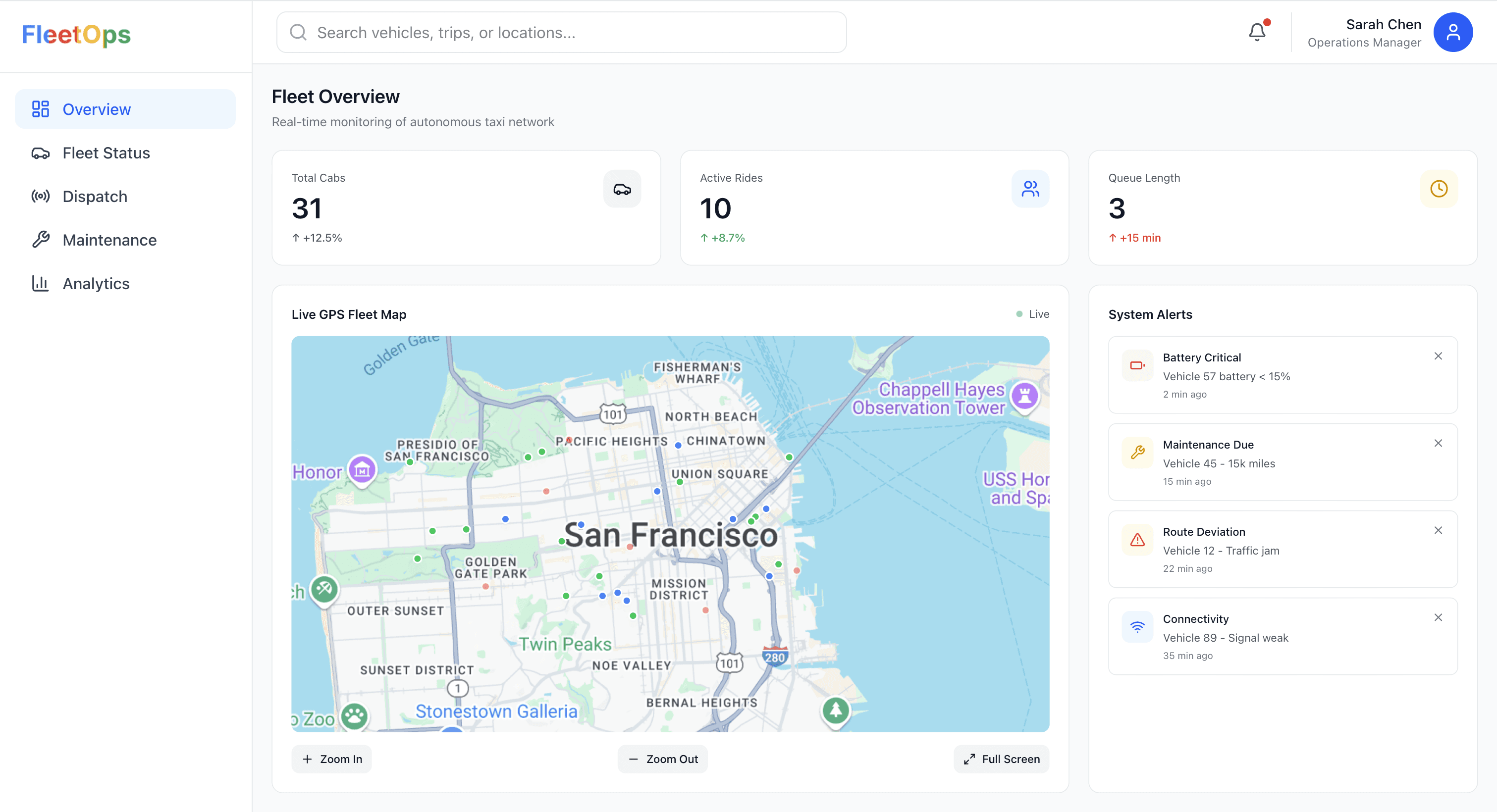
The Fleet Overview screen surfaces what matters most: vehicle availability, live GPS tracking, and critical alerts, so operators can act before issues escalate.
Integrated Maintenance Flow
Tapping into a vehicle alert brings you straight into a structured maintenance workflow. No tab switching, no guessing, just issue logged, assigned, and tracked.
Designed for Decision Speed
Both screens prioritize clarity and actionability. Visual hierarchy, color-coded signals, and two-click responses make complex decisions feel simple.
Operator-Centric Design
This workflow was shaped by real dispatcher pain points: too many tools, too little context. The result? A system that works the way they do.
Key Features
With the problem defined and the core idea in place, we shifted focus to the key product flows that would bring the dashboard to life. This wasn’t just about UI, it was about enabling dispatchers to move seamlessly between monitoring, decision-making, and follow-up, without losing context.
Each feature below was designed to solve a specific operational challenge we uncovered in research from smarter rerouting to faster fault resolution and represents a building block of the larger system.
Tracking Maintenance Without Spreadsheets
What It Is
A maintenance board that tracks issue status (Open → In Progress → Resolved), paired with real-time health indicators and fleet stats.
Why It Matters
Operators no longer rely on spreadsheets or email threads to monitor vehicle status, everything from battery alerts to service logs now lives in one place.
What It Improves
Drag-and-drop ticket updates
Avg resolution time: 4.2 hours
Fleet uptime: 97.3%
Making Alerts Instantly Actionable, Not Just Notified
What It Is
A real-time feed of critical issues, battery, maintenance, routing, or connectivity, linked to quick actions.
Why It Matters
Replaced scattered warnings with one centralized, color-coded panel. Each alert opens a vehicle modal with status and instant options.
What It Improves
1-click triage (e.g., Send to Charging)
22% faster fault resolution
No more missed alerts
Helping Operators Choose Smarter Routes in Seconds
What It Is
A module that compares current vs. optimal route times using real-time + historical traffic data.
Why It Matters
Gives dispatchers visual evidence for re-routing decisions: no guesswork, no extra clicks.
What It Improves
Saved an average of 5.7 minutes per ride
Boosted trust in system suggestions
One-click “Apply Best Route” to push to live dispatch
User Research
Designing for autonomous fleet ops came with a unique challenge: this exact workflow doesn’t exist yet. Companies like Waymo and Zoox operate these systems, but we didn’t have direct access to them and local fleet managers don’t manage autonomy at scale.
Who We Spoke To:
Dispatchers, juggling vehicles, routes, and requests
Fleet supervisors, monitoring live performance and vehicle availability
Maintenance leads, coordinating service and tracking issue logs
In total, we ran:
10 stakeholder interviews
3 usability walkthroughs
1 card sort focused on alert prioritization
What We Heard: Insights That Shaped the Dashboard
Monitoring Notes
Dispatching Notes
Maintenance Notes
Through the interview, we found that
Operators lacked a single source of truth
They were toggling between 3–6 tools to answer basic questions like: Is this vehicle idle? Is it in trouble?
Dispatchers needed visibility to build trust.
Without ETA context or visual feedback, they didn’t trust auto-assign logic and often made decisions manually.
Maintenance workflows were fragmented.
Issues were reported verbally or after the fact. Tracking statuses, assigning work, and closing the loop all happened in different places (or not at all).
Map-based interactions were a common request.
Users wanted to see vehicle health and availability in the context of location, especially for resolving blocked or delayed rides.
Design Solutions
From Insights to Interface: Sketching the System
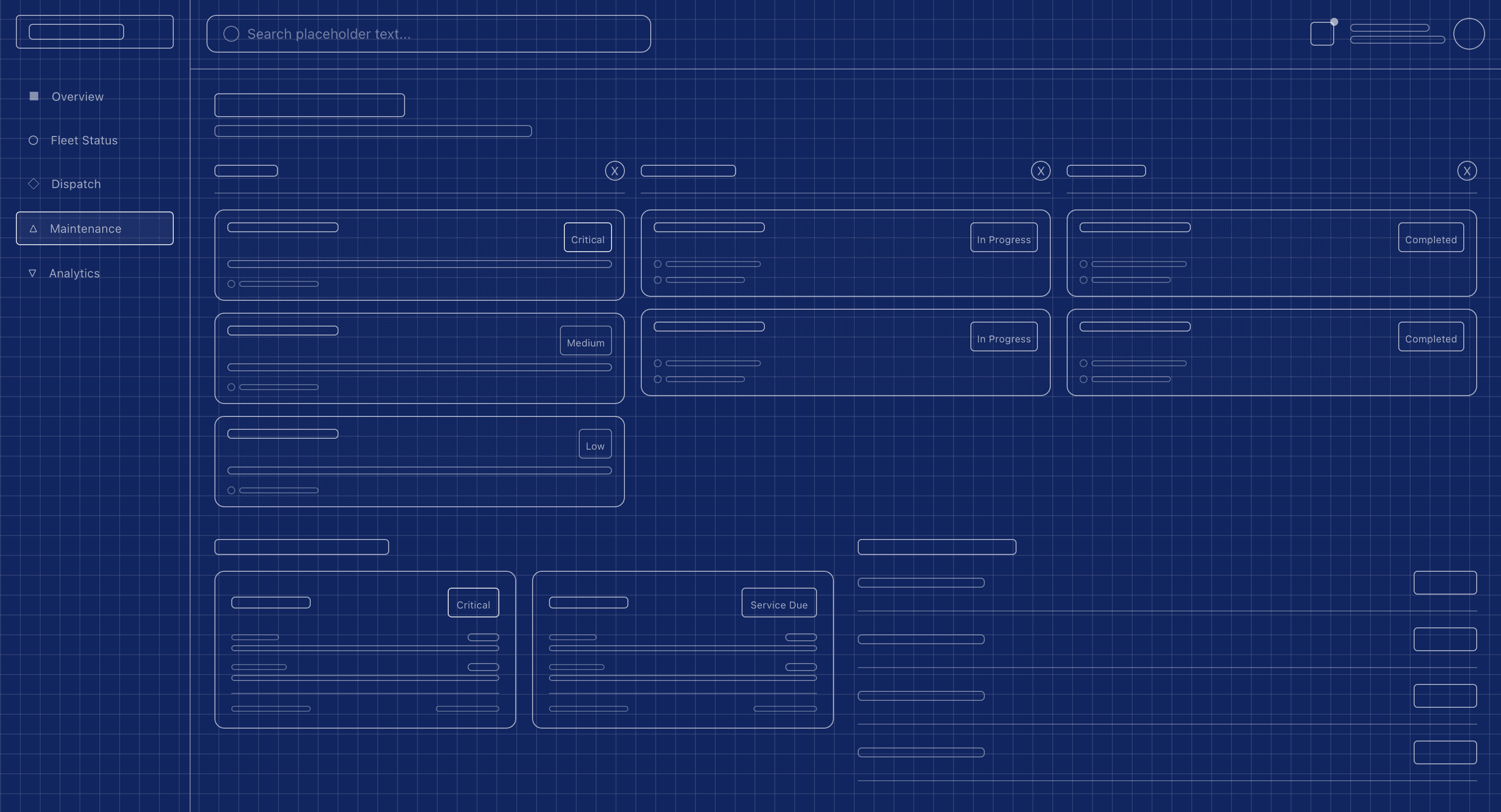
With the core pain points clearly identified, we moved into translating those needs into structure. The goal was simple: build a system where information is visible, decisions are intuitive, and actions are immediate.
We started with low-fidelity wireframes to test layout logic and hierarchy. Each screen was designed to answer a specific question:
Fleet Overview: Is my fleet running smoothly right now?
Alert Panel + Vehicle Modal: What needs attention and what can I do about it?
Maintenance Dashboard: Where are we in the resolution process?
Final Design
With the layout locked, we shifted focus from what lives on each screen to how those elements behave in a live environment.
Our design principles centered on:
Fast cognition → Alerts pulse, KPIs update without reloads
Seamless flow → Clicking an alert leads directly to a vehicle modal
Minimal friction → Most actions are just one or two clicks
Reflection
If This System Went Live Tomorrow...
This project was a simulation, but it surfaced real design principles I’d carry into any ops-critical product:
Design for action under pressure, not just visibility
Validate clarity through task-based testing, not just screens
Center workflows around the humans behind the dashboards
If I had more time (or access to real AV fleet ops), I would:
Explore how this system could scale to 10× more vehicles
Add an AI co-pilot mode for proactive issue surfacing
Build a training flow for onboarding new dispatchers